Lil Planner: Visual Schedule
- 4.7
- Rating
- 10.00K
- Installs
- Free
- Price

 Analysis by App-foxy
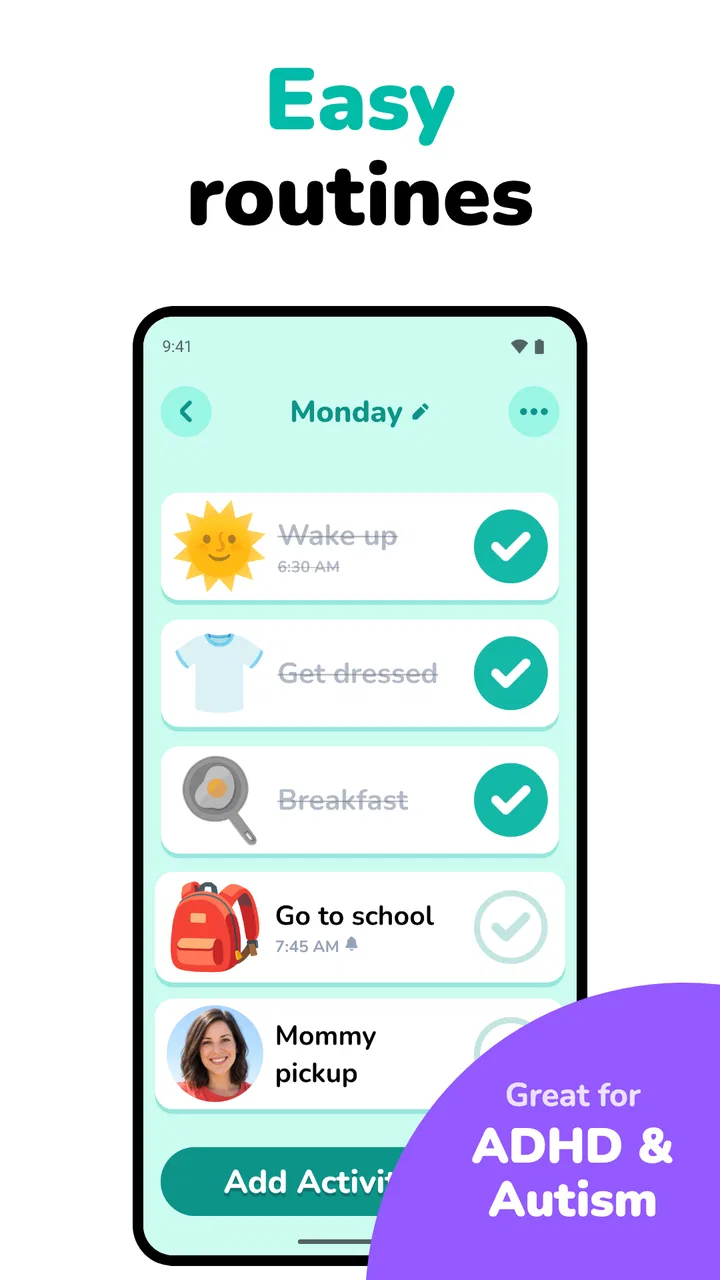
I found Lil Planner: Visual Schedule most useful when I stopped treating it like a conventional calendar and started using it as a gentle sequence of prompts for everyday transitions. Its central idea is simple: turn a child’s routine into something visible and easier to follow. That sounds modest, but it can make a noticeable difference when spoken instructions are quickly forgotten, when moving from one activity to another causes friction, or when a child needs to see what comes next before feeling ready to begin.
My overall view is positive, with an important qualification. This is not a complete family organizer, a behavior-management system, or a replacement for a parent’s support. It is a focused parenting app from Space Sweater that works best as a visual companion to routines already decided at home. The store summary positions it around daily routines and timers for children, ADHD, and autism, and that focus comes through in the way I used it: less as a place to record appointments and more as a way to make a morning, bedtime, homework session, or leaving-the-house sequence feel concrete.
Why a visual routine can work better than another verbal reminder
Many children do not struggle because they refuse to cooperate. They struggle because a routine contains several invisible steps, and each step competes with whatever is happening right now. “Get ready for school” may actually mean stop playing, use the bathroom, get dressed, eat, brush teeth, find shoes, and leave. Adults see the whole chain; a child may only hear one large demand.
You May Also Like

 Pandora - Music & Podcasts
Pandora’s Music Is Easy to Start, but Harder to Recover
Pandora’s strength is its low-effort path from a seed to a station. Its weak spot is how much confidence it asks you to place in connection, setup, and quiet recovery.

 8 Ball Pool
 Is Built on Rivalries, Rematches, and Routine
A close look at the rivalries, rematches, shared routines, and unanswered safety questions that turn a quick pool match into a persistent mobile community.

 Samsung Music
’s Quiet Strength Is Playing What You Already Own
Its reach comes less from spectacle than from dependable access to a personal library. That simplicity is both the app’s strongest retention engine and its ceiling.

 AccuWeather: Weather Radar
AccuWeather Review: A Quick, Clear Forecast for Everyday Decisions
For everyday plans, the best forecast is the one you can understand quickly. AccuWeather makes rain timing, radar, and local conditions easy to act on, with a few trade-offs.

 Hill Climb Racing
Why Hill Climb Racing Still Turns Crashes Into One More Run
A tiny car, a bumpy hill and one more upgrade: Hill Climb Racing keeps resurfacing because its simple chaos makes every near-miss feel personal.

 AliExpress - Shopping App
AliExpress Makes Global Shopping Feel Personal, but Shoppers Bear the Risk
AliExpress turns a global marketplace into a pocket-sized discovery engine. Its reach is useful, its shopping loop compelling, and its trade-offs easy to miss.
More From Our News Desk
View All News


A visual schedule breaks that large demand into recognizable pieces. In my experience, that changes the conversation. Instead of repeating the entire instruction, I can point back to the next item and keep the focus narrow. The child does not have to remember the complete sequence at once, and I do not have to keep inventing new reminders every few minutes.
The timer element is especially relevant during transitions. A schedule can show what needs to happen, but a timer gives an activity a boundary. That combination is more practical than either tool alone. A picture or label can explain the plan, while a countdown can signal that playtime, screen time, or preparation time is approaching its end.
I would not describe the experience as magic. A visual schedule does not automatically make an unpopular task enjoyable, and it cannot resolve every sensory, emotional, or attention-related difficulty. What it can do is remove some uncertainty. That is a meaningful strength because uncertainty is often what turns a small transition into a long negotiation.
My strongest use case: building a repeatable morning
The clearest everyday scenario is a school morning. I would set up the sequence before the rush begins, using short, familiar steps rather than broad instructions. A workable order might be waking up, bathroom, clothes, breakfast, teeth, bag, shoes, and out the door. The value is not in making the list impressive; the value is in making it match the child’s actual morning.
On a calm day, the schedule can become a prompt for independence. Instead of asking what comes next, the child can check the routine and return to it. On a difficult day, it gives the adult something neutral to refer to. That matters because repeating “come on” or “you need to hurry” often adds emotional pressure without adding useful information.
A small but important tip is to avoid putting every possible task into the first version. If the display becomes crowded, the schedule may feel like another burden. I would begin with the steps that most often cause delays, then add detail only when the child understands the basic flow. This is one of the app’s best practical lessons: the schedule should reduce mental load, not document every movement in the house.
The same approach works at night, although the order and tone change. A bedtime routine can make the final part of the day more predictable, particularly when a child finds it hard to stop an enjoyable activity. I would keep the sequence consistent and use the timer as a transition aid rather than as a threat. “The timer is showing that we are moving to the next step” is more helpful than presenting it as a punishment for not moving quickly enough.
Where the app feels more useful than a paper chart
Paper charts still have real advantages. They are visible without a device, easy to customize with stickers, and familiar to many families. A whiteboard can also be excellent when the whole household needs to see the plan. However, a digital routine tool is easier to adjust when the day changes. That flexibility matters for appointments, weekends, school holidays, or a child whose energy level is different from usual.
The timer is another reason I would choose a digital approach here. A paper list can show the order of tasks, but it cannot provide the same active sense of time. Parents often end up using a separate phone timer, which means switching between tools and explaining which alarm belongs to which activity. Keeping the routine and timing conceptually together makes the workflow easier to follow.
Compared with a general calendar, this app is more immediate and child-facing. Calendars are designed around dates, events, and adult planning. A child usually needs a much smaller question answered: what am I doing now, and what happens after that? Lil Planner is better suited to that narrow question than a busy family calendar.
Compared with a generic countdown timer, it offers more context. A timer alone can tell a child that time is passing, but it does not explain why the timer matters or what follows it. The schedule supplies the missing sequence. That is the strongest argument for using this particular type of app instead of simply setting alarms on a phone.
Useful adjustments for ADHD and autistic routines
The references to ADHD and autism should not be read as a promise that one layout will suit every child. Needs vary widely. Still, the app’s focus makes sense for routines where predictability, external prompts, and clear transitions are helpful. I would use it as a support for executive-function demands, not as a label-driven solution.
For a child with ADHD, I would keep individual actions concrete and short. “Pack school bag” may still contain too many decisions, while “put lunch box in bag” is easier to start. The schedule can support initiation, but the parent may still need to help with prioritizing, locating items, or returning attention to the task.
For an autistic child, predictability may be more important than speed. In that situation, I would avoid changing the order casually just to make the routine faster. If a change is unavoidable, I would use the schedule as a place to show the new sequence early and explain what is different. The tool can support preparation, but it cannot remove the discomfort of every unexpected event.
A non-obvious trade-off is that more visual detail is not always more accessibility. Some children benefit from a very clear sequence with limited choices; others need specific steps to understand what an instruction means. I would test the shortest version first, watch where the child still gets stuck, and expand only those parts. That turns the app into an observation tool as well as a schedule: it helps reveal which transitions actually need support.
What I would change in my own setup after using it
I would separate routines by context rather than trying to create one enormous master plan. A morning routine, an after-school routine, and a bedtime routine have different energy levels and different trouble spots. Keeping them distinct makes each one easier to read and gives the child a clearer sense of the current part of the day.
I would also use the app to plan recovery after a difficult transition. For example, after school, the sequence might not begin with homework. It could start with arriving home, putting belongings away, having a snack, taking a quiet break, and then choosing between homework or another planned activity. This is more realistic than assuming every child can move directly from a demanding school day into another demanding task.
Another useful approach is to treat the timer as a preview rather than a last-second alarm. If a child becomes distressed when an activity ends, a warning before the final countdown may be more effective than suddenly announcing that time is over. The app cannot replace a calm explanation, but it can give that explanation a consistent structure.
I would review the routines periodically, especially when the child becomes comfortable with them. A schedule that once encouraged independence can become unnecessary for a particular step. Removing support gradually can be just as important as adding it. Otherwise, the child may learn to wait for the app or for an adult prompt instead of using the routine as a bridge toward doing more independently.
Limitations that matter before you rely on it
The biggest limitation is that the app depends on thoughtful setup and consistent use. It will not know which tasks are difficult in your home, which transitions trigger resistance, or how much time a child genuinely needs. If the routine is vague, unrealistic, or too long, the digital format will not fix the underlying plan.
There is also a risk of turning the schedule into a source of pressure. If every missed step becomes evidence that the child is “not following the plan,” the tool can feel controlling. I would use it as a shared reference, not as a scoreboard. Flexibility matters when a child is tired, unwell, overwhelmed, or facing a change that the original routine did not anticipate.
Families should also think about device dependence. A phone or tablet can be distracting, and some children may focus on the device rather than the routine. If that happens, I would keep the device in a predictable location, use it briefly to check the current step, and then return attention to the real-world task. For a child who becomes more absorbed in screens, a paper chart may be the better choice even if it offers fewer timing features.
The free price makes trying the app approachable, but in-app purchases range from $5.99 to $59.99 per item. That is a substantial spread, so I would explore the experience carefully before paying for anything and decide whether the additional value fits the family’s actual routine. A parent who only needs a simple visual list may not need to spend money at all, while a family using the app across several daily transitions may judge extra options differently.
I also would not choose it as the main tool for adult scheduling. If your priority is shared appointments, school events, medication reminders, shopping, or coordination between several caregivers, a family calendar is likely the stronger option. Lil Planner is more focused on the child’s immediate sequence than on household administration. That narrow purpose is a strength when it matches the need, but a weakness when someone expects an all-in-one organizer.
Who is most likely to benefit
I think it suits parents who are tired of repeating the same instructions and want a calmer way to make routines visible. It is particularly promising for children who understand a task once it is broken into steps, who ask repeatedly what happens next, or who find transitions harder than the activities themselves.
It may also help caregivers who support children with ADHD or autism and want a consistent prompt that does not rely entirely on spoken language. The app can give adults a common reference point, which is useful when several people share care and each person would otherwise explain the routine differently.
Older children may appreciate being able to check the sequence themselves, while younger children may need an adult to introduce each step. The right balance depends on the child. I would not measure success by whether the child uses the app without help immediately. A better sign is whether prompts become shorter, arguments become less repetitive, or the child begins checking the next step before asking.
I would skip it, or at least test it cautiously, if your child dislikes digital prompts, becomes fixated on countdowns, or needs a highly tactile routine with physical objects. I would also look elsewhere if you need detailed collaboration between caregivers or a broad family-planning system. In those cases, a visual board, a shared calendar, or a specialized support approach may fit better.
Practical questions I had while using it
One question is whether it can work for more than one kind of routine. In practical terms, that is the way I would approach it: not as a single morning checklist, but as a set of context-specific sequences. The app becomes more useful when each routine reflects a real moment in the day instead of trying to cover everything at once.
Another question is whether it is suitable for a child who cannot yet read comfortably. The visual-schedule concept points toward a more accessible approach than text-only planning, but I would still adapt the level of adult guidance to the child. A visual cue can support understanding, yet it does not automatically explain a task that is unfamiliar or too broad.
Parents may also wonder whether a timer will make transitions easier or more stressful. My answer is that the presentation matters. I would introduce it during calm moments, explain what the timer means, and avoid using it to surprise the child. If the countdown itself increases anxiety, the schedule may still be useful without making timing the center of every transition.
Finally, I would ask whether the app can replace professional guidance. I would not use it that way. It is a practical routine aid, not an assessment or a therapy plan. If a child’s daily difficulties are severe, suddenly changing, or affecting safety and wellbeing, the app should sit alongside appropriate support rather than being expected to solve the whole problem.
My verdict after weighing the trade-offs
Space Sweater has made a focused parenting app rather than an overloaded productivity product. That focus is why I can recommend it to the right household. The combination of visual sequencing and timers addresses a very specific problem: making transitions and multi-step routines easier to understand in the moment.
Its best results will come from careful editing, realistic expectations, and a willingness to adjust the routine around the child rather than forcing the child to fit a rigid plan. I would start with one difficult part of the day, use short steps, observe what actually helps, and resist adding features or tasks simply because they are available. That workflow is more important than creating a beautifully complete schedule.
The app is free to begin with, carries an Everyone content rating, and has reached over 10K installs with a 4.8 average from around 398 ratings. It was released on September 16, 2025, and version 3.0.27 supports Android 7.0 and later. Those details make it easy for many families to try, while the optional purchase range is worth keeping in mind before committing to paid extras.
My final recommendation is straightforward: try Lil Planner if your main challenge is helping a child see and move through daily steps, especially around mornings, bedtime, school preparation, or transitions away from preferred activities. Keep a paper chart or another planning tool in mind if your needs are broader, more tactile, or centered on caregiver coordination. Used with patience, the app is best as a calm external prompt, not a strict rulebook. That distinction is what makes it genuinely helpful rather than just another source of reminders.
FAQs for Lil Planner: Visual Schedule
01What is Lil Planner: Visual Schedule and how does it work?
Lil Planner: Visual Schedule is a user-friendly app designed to help users organize their daily activities using visual aids. It offers a simple interface where you can create personalized schedules using images and icons, making it ideal for children, individuals with learning disabilities, or anyone who prefers visual planning. Users can easily drag and drop icons to tailor their schedules.
02Is Lil Planner suitable for children and individuals with special needs?
Yes, Lil Planner is specifically designed to be accessible for children and individuals with special needs. The app uses visual cues and an intuitive drag-and-drop interface, making it easy to understand and use. This visual approach helps in improving time management skills and promoting independence among users.
03Can I customize the icons and images in my schedule?
Absolutely! Lil Planner allows you to customize your schedules by adding your own icons and images. You can upload personal photos or choose from a library of existing icons to make the planner more relatable and engaging. This feature ensures that the app meets diverse user needs and preferences.
04Does Lil Planner offer notifications or reminders for scheduled tasks?
Yes, Lil Planner includes a notification feature that reminds users of their scheduled tasks. You can set specific times for alerts to ensure that no activity is missed. This feature is particularly useful for maintaining routine and ensuring tasks are completed on time.
05Is Lil Planner available on both Android and iOS platforms?
Lil Planner is available for download on both Android and iOS platforms. You can find it on the Google Play Store for Android devices, and the Apple App Store for iOS devices. The app provides a seamless experience across both platforms, ensuring accessibility for a wide range of users.
Pros
- User-friendly interface for easy navigation.
- Customizable schedules to fit personal needs.
- Supports visual cues for better understanding.
- Syncs across devices for convenience.
- Includes reminders to keep users on track.
Cons
- Limited free features without subscription.
- No offline mode available for use.
- Initial setup can be time-consuming.
- Occasional app crashes reported by users.
- Lacks integration with third-party calendars.

Lil Planner: Visual Schedule
Gallery